
Chance
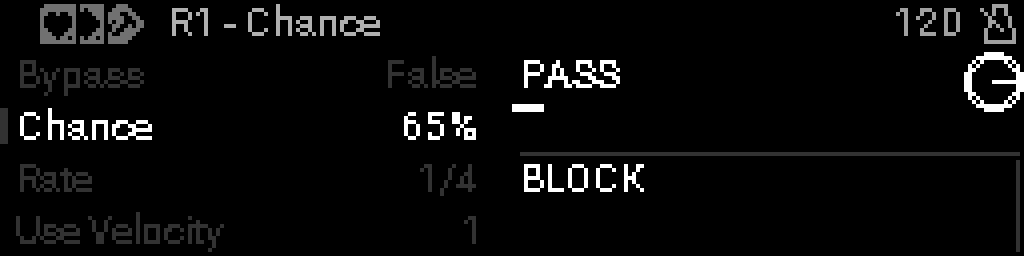
Probabilistic note gate
When to use it
Insert Chance to probabilistically pass or drop notes (and optionally scale surviving velocity). Use rate to thin a dense stream over time.
Parameters
| Parameter | Range | What it does |
|---|---|---|
| Bypass | 0 – 1 | When on, the device is disabled and MIDI passes through unchanged. |
| Chance | 0 – 100 | Probability (0–100%) that a note is allowed through. |
| Rate | 0 | Clock division for each step — how fast the pattern advances. |
| Use Velocity | 0 – 1 | When on, dropped notes scale remaining velocity instead of a hard mute. |
Parameter values
Bypass
| Value | Name | Meaning |
|---|---|---|
| 0 | Off | Device is active and processes MIDI. |
| 1 | On | Device is bypassed; messages pass through unchanged. |
Rate
| Value | Name | Meaning |
|---|---|---|
| 0 | Off | No rate thinning — only per-note chance applies. |
| 1 | 1/1 | Allow roughly one message per 1/1 clock slice. |
| 2 | 1/2 | Allow roughly one message per 1/2 clock slice. |
| 3 | 1/4 | Allow roughly one message per 1/4 clock slice. |
| 4 | 1/8 | Allow roughly one message per 1/8 clock slice. |
| 5 | 1/16 | Allow roughly one message per 1/16 clock slice. |
| 6 | 1/32 | Allow roughly one message per 1/32 clock slice. |
| 7 | 1/64 | Allow roughly one message per 1/64 clock slice. |
Use Velocity
| Value | Name | Meaning |
|---|---|---|
| 0 | Off | Dropped notes are silent. |
| 1 | On | Passed notes keep proportional velocity. |