Arrange
Arrange is the song grid for stored snapshots: 4–256 rows of time (default 16) × 10 columns (Knobs, S32 LFOs, Rack 1–8). When the playhead lands on a row it recalls every occupied cell in that row (a scene). Empty cells are rest (--) and skip that bank. It is not a Step Seq MIDI device and does not sit in a rack.
Open ARRANGE from Main Menu — it is the first item, above Racks. The hub opens on the Knobs column. Rack, LFO, and 4×8 nested menus do not have an Arrange shortcut.
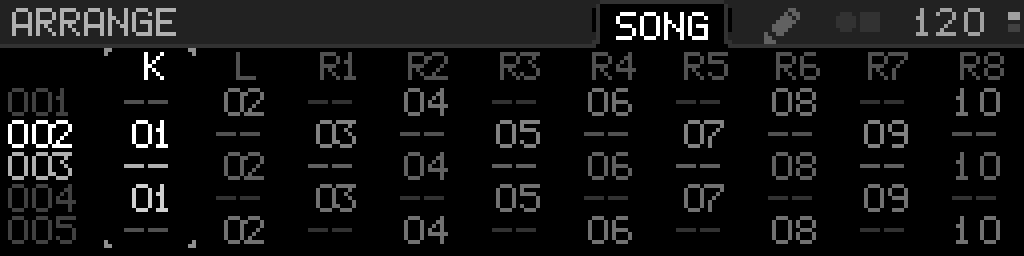
The header title is ARRANGE (no timeline icon). Folder tabs SONG and a pencil sit left of the BPM band (never in it). The selected tab fills the header to the top, with a thin shadow on both sides; the idle tab has no stroke. The pencil is SETTINGS — the header never writes SETTINGS or SET. Two small filled squares between the tabs and the BPM mark Select + Back. Hold Select for a moment on SONG and those squares become a circle and square (hold Select and turn to pick a column). A tap that never reached that hold still opens the cell picker; letting go after the column corners are showing does not. The gray header line runs the full width, including under the BPM, and meets the tab corners with a tiny radius. The BPM metronome in the header animates with the project clock.
SONG tab
All ten columns are on one page: K L R1 R2 R3 R4 R5 R6 R7 R8. Five song rows are visible; longer songs scroll so the focused cell stays in view. Occupied cells show two-digit slot ids 01–32. Rest cells show --. Row numbers on the left are three digits 001–256. The cursor is tiny L-corners at the focused cell (and a full-column handle while you hold Select + turn). Unselected columns dim during that column hold. Idle row numbers are dimmer than the playing row. The playing row is brighter ink (occupied cells go white, rests stay a dimmer gray). There is no playhead bar in the gutter and no line under the column headers. A QUEUE-armed row pulses (row number and cell labels) until it fires or you cancel — idle rows stay still. A morphing bank’s column header is K* / L* / R1*…R8*. Column names are a legend (not an encoder stop).
| Control | SONG |
|---|---|
| Encoder | Move the song row (001–LENGTH, clamped) |
| Hold Select + encoder | Move columns (K … R8); stops at the ends, does not wrap. After a short hold the header mark becomes a circle and square, and the column corners appear even before you turn. Letting go after that hold does not open the cell picker. |
| Select | Open a cell picker (REST + occupied slots). Dark panel, side-menu gray border, selected line inverted (white on black). Encoder does not wrap. Back cancels. Select applies. After the pencil → SONG, the first Select still opens the picker. |
| Select + Back | Switch to the pencil tab (not zoom; not Select long-press) |
| Encoder click | Clock Start/Stop |
| Back | Leave Arrange |
The playing row follows the project clock. Start transport from the encoder button (Clock Start/Stop) or Clock Settings.
Pencil tab
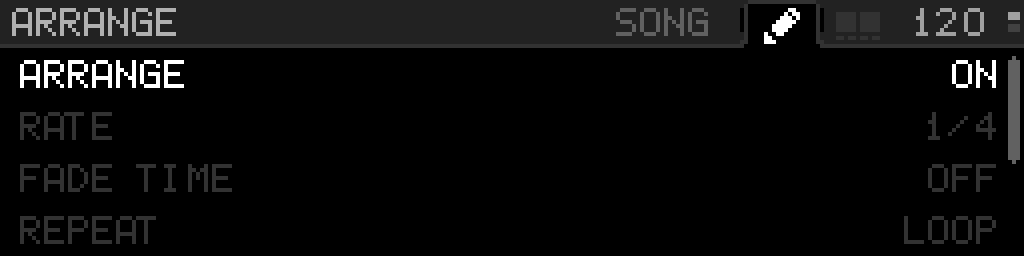
A full-width list with the same 13 px rows as other parameter lists (four visible; encoder scrolls): ARRANGE, RATE, FADE TIME, REPEAT, LENGTH, JUMP TO, QUEUE. Encoder moves between rows. Selected rows are white text on the canvas, like menus, with the same tiny L-corners as SONG (Gray6). Hold Select marks the row Gray8 (no filled band). Short Select on RATE, FADE TIME, REPEAT, or LENGTH latches sticky edit (nested corners; turn without holding Select). Tap Select again to keep the value; Back restores it — including the SONG / JUMP TO row if you had shortened LENGTH. Turn the encoder while holding Select to edit ARRANGE / RATE / FADE TIME / REPEAT / LENGTH, or to pick the SONG-focused row on JUMP TO (001–LENGTH, the same cursor as SONG). ARRANGE ON/OFF, REPEAT, RATE, FADE TIME, and LENGTH stop at the ends — they do not wrap. Hold Select on QUEUE does nothing. Select+Back returns to SONG. Back leaves Arrange (it does not return to SONG) unless sticky edit is open, in which case Back restores first. Encoder click is Clock Start/Stop.
Changing Rate while the arrangement is running keeps the current song row and the time already spent on it. If the new rate is longer (or shorter but you have not used up the new length yet), the row continues from those ticks. If the new rate is shorter and you are already past it, the playhead waits for the next bar, then moves once. Arrange Fade Time is only how the playhead glides in — pad / MIDI / SNAP-macro glides use each bank’s own FADE TIME. It does not move the playhead.
Arrange (the first pencil-tab row) is whether the arrangement runs. ON (default) lets the playhead, Jump To, and Queue recall snapshots. OFF freezes the playhead and ignores Jump / Queue; the SONG grid stays editable. Select tap toggles ON/OFF. Turning the encoder while holding Select moves toward ON or OFF and stops at the end — it does not wrap. Old projects load as ON.
Rate is how long each row lasts against the project clock (24 PPQN):
| Rate | MIDI clocks |
|---|---|
| 1 BAR (default) | 96 |
| 2 BARS … 128 BARS | 96 × bars, including 3, 5, 6, 7, … |
Old projects that stored 1/8 or 1/4 load as 1 BAR. Start fires row 0 immediately at every Rate. Rate is how long until the next row. Transport Start resets the playhead; Continue keeps it.
Fade Time is how a playhead recall arrives (musical time at project BPM). The musical-time choices are unchanged. Jump To and Queue stay instant.
| Fade Time | Beats (4/4) |
|---|---|
| OFF (default) | Instant |
| 1/16 | 0.25 |
| 1/8 | 0.5 |
| 1/4 | 1 |
| 1/2 | 2 |
| 1 BAR | 4 |
| 2 BARS | 8 |
| 4 BARS | 16 |
Repeat is LOOP (wrap after the last filled row inside the current length) or ONCE (play to that row and stop).
Length is how many song rows are active (4–256, default 16). Hold Select + encoder. Shrinking the song does not erase hidden rows — lengthen again and they are still there. Jump, Queue, and the playhead stay inside the current length.
Jump To fires the focused song row now (instant — bypasses Fade Time) and cancels Queue. Queue arms or cancels that same row for the next Rate boundary (also instant versus a playhead fade). Both are a single Select tap. They do nothing while ARRANGE is OFF. Queue reads ARMED or OFF, never a second row number. While Queue is ARMED, that word pulses on the pencil tab (and the armed SONG row pulses). Jump To snaps an in-progress fade to its target; Queue cancels the fade without snapping. Queue still works after ONCE has already stopped.
When a row fires:
- Rest (
--) or an empty slot — that column is skipped. - Occupied slot different from the one already active — recall that snapshot (playhead uses Fade Time; Jump To and Queue are instant). A fade already running toward a different occupied pad on that bank retargets from the live sound.
- Same slot as now — no second recall.
- Other columns in the row still fire.
Arrange edits and recalls do not force a flash save. Use Save Project so the pattern survives power-off.
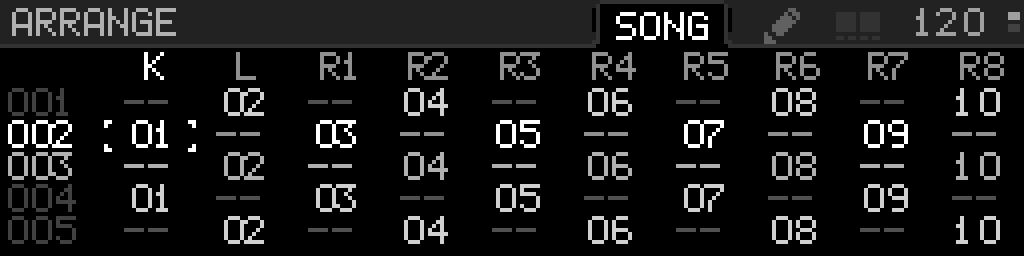
Hold Select for a moment (not a tap) on SONG: the header mark becomes a circle and square, and Gray8 L-corners mark the current column before you turn. Letting go then does not open the cell picker.