
Morph
Occupied Select on a snapshot pad glides from what you are hearing to that pad. FADE TIME on that bank’s pencil is the glide length in musical time at project BPM. When fade is OFF, Select is instant. Arrange FADE TIME is only the song playhead.
MIDI, a mapped slot, a macro, and the Arrange playhead use the same glide. There are no SET MORPH A / SET MORPH B marks and no END MORPH row. Pads do not show A/B marks.
Start a morph
On any 4×8 (knobs, LFOs, racks):
- Occupied Select starts (or continues) a morph live → that pad when this bank's FADE TIME is on. When this bank's FADE TIME is OFF, occupied Select lands instantly.
- Hold Select and turn the encoder on an occupied BANK pad to arm a morph from what you are hearing to that pad at 0%. The first click arms and moves the blend. After a short hold the header mark becomes a circle and square so you can see that this hold is a blend, not a tap. This works with fade OFF (the clocked glide does not start). While a glide is already running, hold Select and turn still rides the amount. Turning past 100% does not wrap back to 0% on the same hold, and 100% stays armed so you can turn back. Opening pad Options (keep holding Select) uses the encoder for the menu — it does not morph. Let go below 100% and the mix stays at that percent; hold Select and turn again to continue from there.
- Another occupied pad while a glide is running retargets — it ends the current glide and starts a new one from the live sound to the new pad. You do not confirm END + RECALL. With fade OFF, retarget the blend pad by holding Select and turning on a different occupied pad — a tap still lands instantly.
- The same pad you are already morphing toward does not restart a glide.
- Empty pads TAKE (or dest-pick). They do not morph.
- Back on the 4×8 drops a manual morph without landing on the pad.
While a morph is running, the pad you are blending toward shows a fader and percent as one group (after the pad number, with a little air from the index). Live is the near end; that pad is the far end. The header stays Knobs Snapshots. The fader stays the same width from 0% to 100% — only the percent text changes. The group hides about a second and a half after you stop turning, or after a mapped morph knob stops moving. Hold Select and turn again to continue from the last percent, including at 0% or 100%. Let go at 100% and that pad becomes the live snapshot. Arrange SONG still marks that column K* / L* / R1*…R8*.
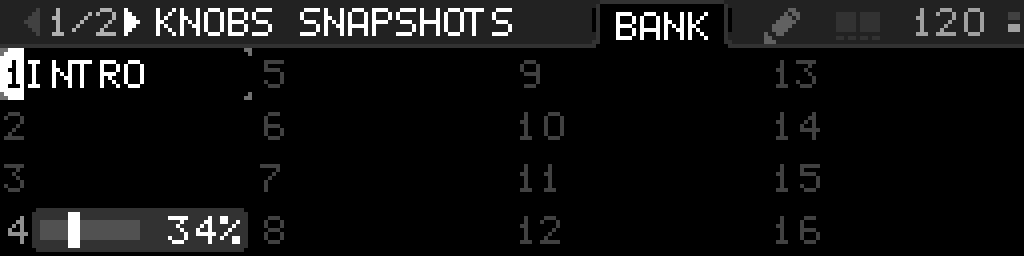
Sweep the amount
While a morph is running (including a hold-arm at 0% or 100%), hold Select and turn the encoder on that 4×8. A slow turn moves about 1%; turning faster takes larger steps (the same slow/fast encoder feel as other values). 0% is what you are hearing now — the physical knob once pickup has caught, or when pickup is off. If pickup has not caught, 0% stays on that catch; catching during a morph does not jump 0% to the knob and does not end the morph. 100% is the target pad. Reaching 100% does not end the hold — turn back toward 0% to morph toward live again. Letting go at 100% lands the pad. Letting go below 100% keeps that percent so the next hold continues from there.
You can also map the amount from a knob or from MIDI CC / 14-bit CC (SETTINGS → MAPPING → MAP MORPH). That mapping is a fader from what you are hearing to the current snapshot on that bank — the same idea as a crossfader between two tracks, for MIDI and the other snapshot fields. You do not have to start a pad glide first. First motion arms live as the near end; 100% is the selected snapshot; 0% follows live (hardware after catch), not a freeze from when the morph started. Recalling or taking a different snapshot aims the same fader at that scene. The mapping hub is titled MAP AMOUNT (Internal knob or External CC / 14-bit CC). Learn External with CC or 14-bit CC (not notes or a physical knob move). The mapped knob is the amount (plus optional MIN / MAX as 0–100% and INVERT). On the macro grid, PART reads KNOBS, LFOS, or RACK1…RACK8. Program Change and notes do not drive amount. An LFO cannot target morph amount (and still cannot target snapshot index). MAPPING → UNMAP MORPH removes that mapping.
Hold Select and turn on an occupied BANK pad still morphs toward that pad (a manual override). Empty banks do nothing.
A morph-amount knob is not rewritten when the knobs snapshot morphs or recalls — it stays the blend fader. Snapshot-slot and morph-amount macros do not show PICKUP. Pickup on other macros keeps the solid value line on the physical knob: dim until you catch, bright when you are in control. The dotted catch line is brighter. While an LFO is modulating that macro you can still catch when the mix is not moving; the LFO follows the catch as an offset. When the LFO sits on the catch, that LFO mark is dotted too.
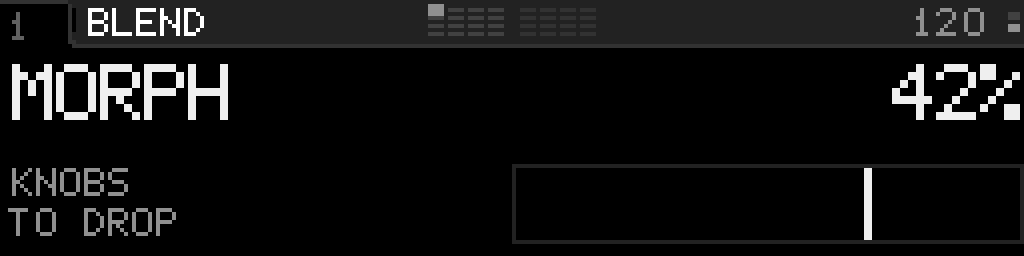
A morph-amount macro on Perform reads MORPH, the bank (Knobs, LFOs, or the rack name), TO DROP, and 42% on the right while that bank is morphing. Idle, the destination is the current snapshot on that bank. When only one or two macros are on, Perform gives it the taller layout — see Snapshot and morph knobs on Perform.
- 0–49%: discrete fields and the whole Step Seq pattern stay on live (A).
- 50–100%: those fields jump to the target pad.
Continuous values move smoothly the whole way: pot positions, LFO rate / depth / phase / offset, and device parameters that have a real range (not enums, notes, or channels).
A macro, device, or LFO set to IN SNAPSHOT OFF stays where it is for the whole morph. That switch covers every snapshot. See One switch for a whole macro, device, or LFO.
A parameter set to IN SNAPSHOT OFF is skipped by a morph at every position, including the ends. That row is hidden while its device or LFO is OFF. See Keep one parameter under your hands.
A parameter set to ALLOW MORPH NO (with IN SNAPSHOT ON) stays live during the fade and jumps to the snapshot at 100%. It does not lerp.
MIDI is sent only when a value changes, using the same pickup rules as a recall: the morph output is the logical value; physical knobs still have to catch up.
The Step Seq playhead keeps running. Morphing does not emit a new note for every in-between pattern — the pattern swaps as a whole at 50%.
Fade Time
FADE TIME on that bank’s pencil sets how a pad / MIDI / SNAP-macro recall lerps into the target slot, in musical time at the project BPM: OFF (instant, default), then 1/16, 1/8, 1/4, 1/2, 1 BAR, 2 BARS, 4 BARS. Hold Select and turn the encoder to change it. Arrange pencil → FADE TIME is only how the playhead glides — it does not change pad recalls.
- A recall from Main Menu Snapshots, a mapped slot, or a macro uses that bank’s FADE TIME. The Arrange playhead uses Arrange FADE TIME. Both glides use the same live 0% as encoder / MAP MORPH — they do not freeze a past mix when the fade arms.
- When this bank's FADE TIME is OFF, occupied Select is instant. You can still morph by holding Select and turning the encoder on that pad.
- Take and delete on that bank wait until the fade finishes.
- Arrange Jump To and Queue stay instant. Jump To aborts an in-progress fade by snapping to the fade target, then jumps. Queue cancels the fade without snapping, then the queue can fire.
A knob or MIDI mapping can still step a snapshot slot index (SETTINGS → MAPPING → MAP SNAPSHOT). MAP MORPH is the blend-amount mapping under the same MAPPING row — not a second destination pad.