
SysEx editor
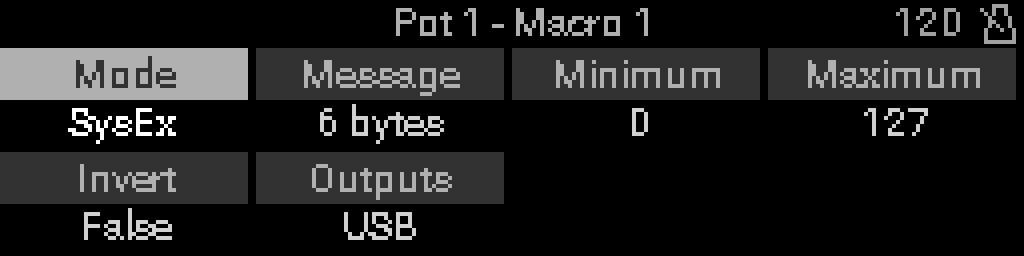
Open the SysEx editor from a SysEx macro’s Message row. Use it to define the raw System Exclusive payload and mark which bytes the knob modulates via MSB and LSB slots.
Open the editor
- Configure the macro mode to SysEx (see Setting up macros).
- In the macro grid, highlight Message.
- Press Select.
Browse bytes
The editor shows F0 and F7 anchors with up to 16 data bytes between them. Turn the encoder Turn the encoder to move focus across bytes and the + append slot.
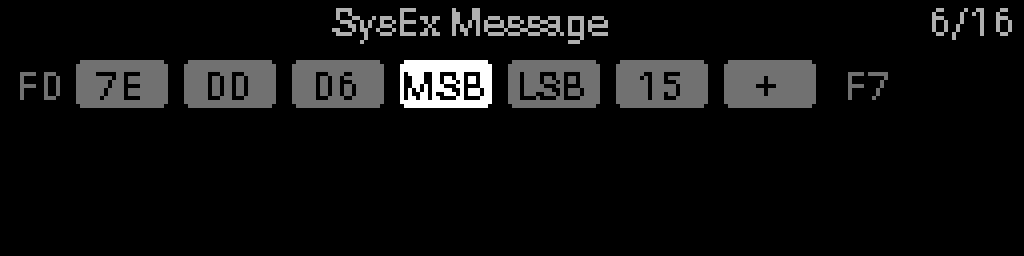
Example in the screenshot: Universal Non-Real-Time SysEx header 7E 00 06, with MSB and LSB assigned on two payload bytes, hex byte 15, and + to append another byte. Counter 6/16 = six payload bytes used.
| Label | Meaning |
|---|---|
Hex pair (e.g. 7E) | Data byte value |
| MSB | This byte receives the knob’s coarse (7-bit) modulation |
| LSB | This byte receives fine modulation for 14-bit control |
| + | Append a new byte at the end |
Edit or add a byte — hold Select
- Focus a byte or the + slot.
- Hold Select — the value picker opens with up/down arrows.
- Turn the encoder Turn the encoder to choose Empty (
--, delete), MSB, LSB, or a hex value00–7F. - Release Select to apply and advance focus.
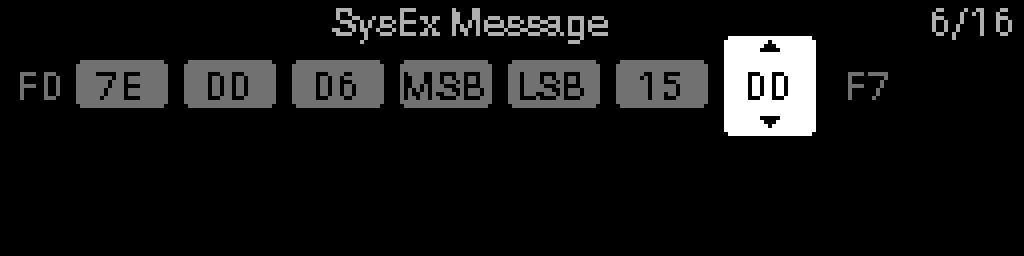
The screenshot shows the + append slot with the picker set to 00 — scroll up for Empty, MSB, or LSB when those slots are still free.
TIP
Assign MSB and LSB on different bytes when you need 14-bit resolution inside the SysEx payload. The macro Minimum / Maximum range maps knob travel onto those slots.