
Snapshots
A snapshot is a scene inside the active project — a stored set of live values you can recall during a set.
This firmware has three live banks, and each one has one door — you open it from wherever that part already lives. Main Menu → ARRANGE (first item) is the song grid.
Knob snapshots — Main Menu → Snapshots opens the 4×8 slot grid (header Knobs Snapshots). Occupied Select glides live to that pad when this bank's FADE TIME is on, or lands instantly when it is OFF. Hold Select and turn the encoder to morph by hand. Select+Back toggles BANK and the pencil. Long-press on BANK: take, rename, delete, copy, swap, move. MAPPING and SYNC are on the pencil tab.
Rack snapshots — Racks list → Long-press Select → SNAPSHOTS BANK opens that rack's 4×8 (Rack 1 Snapshots…Rack 8 Snapshots).
LFO snapshots — S32 LFO grid → Long-press Select → SNAPSHOTS BANK opens the 4×8 (LFOs Snapshots).
Open a snapshot bank — All three doors side by side, and where Back goes from each pad.
Arrange — ARRANGE on Main Menu (above Racks). SONG is a grid of 4–256 rows (default 16) × 10 columns; the pencil tab is Arrange, Rate, Fade Time, Repeat, Length, Jump To, Queue. Playhead recalls use Fade Time; Jump To and Queue stay instant.
Morph — Occupied Select (and MIDI / SNAP-macro) glides live to that pad using this bank's FADE TIME. The Arrange playhead uses Arrange FADE TIME. Another occupied pad retargets. Empty pads TAKE. MAP MORPH is a fader from live to the current snapshot (0% what you are hearing, 100% that scene).
Keep one parameter under your hands
Some controls you want to own live — a filter cutoff you ride by hand, an LFO rate you nudge with the tempo. Take that parameter out of snapshots entirely:
- Turn the encoder Encoder — highlight the parameter in a device parameter list or an LFO parameter list.
- Long-press Select → Options.
- Select the third row, IN SNAPSHOT ON. It flips to IN SNAPSHOT OFF and stays on screen, so you can see the state without leaving the menu.
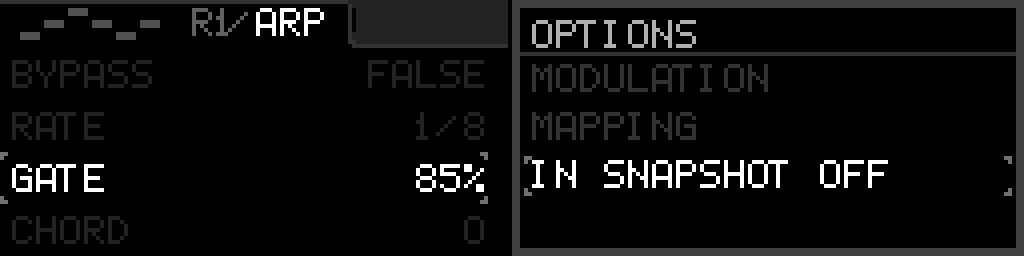
While a parameter reads IN SNAPSHOT OFF, no recall on any bank or slot moves it. Neither does a this bank's FADE TIME glide, an Arrange FADE TIME playhead glide, or a morph — not even at 0% or 100%. It stays exactly where you left it.
The switch is one live control for every snapshot. It is not part of a single pad. Save Project keeps it. Every parameter starts at IN SNAPSHOT ON.
When IN SNAPSHOT is ON, ALLOW MORPH YES sits on the next row. Flip it to ALLOW MORPH NO so that parameter stays live during a fade or morph and only jumps to the snapshot at 100%. The row hides when IN SNAPSHOT is OFF, and it is not shown for channel, port, note, MIDI type, per-step, or pattern fields. Bypass, sync, mode, and scale start at NO. Rate, depth, offset, ranged values, and LFO wave start at YES. Wave type still steps from one shape to the next — it does not crossfade tables.
If a knob is mapped to it, a knob snapshot still moves the knob to its stored position — that position is part of the scene, and anything else the same knob drives still follows it. The parameter you set aside is the one thing that does not move, so the knob and that parameter can read differently until you next touch it.
TAKE still stores the value. Turning the switch back on restores normal recall from snapshots you already took — nothing is lost while it is off. Duplicating a device carries the switch across.
One switch for a whole macro, device, or LFO
The same words, IN SNAPSHOT ON and IN SNAPSHOT OFF, also sit on the thing that owns the parameters. It starts ON. OFF leaves that whole macro, device, or LFO where it is on every recall, fade, and morph.
| Where | What you hold |
|---|---|
| Edit mode, macro row | Macro N - Options → IN SNAPSHOT |
| Rack device grid | Options → IN SNAPSHOT (with Duplicate, Move, and Remove) |
| S32 LFO grid | Options → IN SNAPSHOT (with Review Assignments and Snapshots Bank) |
| CV16 LFOs list | Options → IN SNAPSHOT only. Long-press Select on the row |
While a device or LFO reads OFF, that parameter’s IN SNAPSHOT row is hidden, and ALLOW MORPH with it. A recall moves a parameter only when the device or LFO is ON and the parameter row is ON.
The header knob grid shows a gap through a cell when any macro on that knob is OFF. An S32 LFO cell, a CV16 LFOs row, and a rack device cell show OFF.
EDIT SNAPSHOT on an occupied pad is Rename, Copy, Swap, Move, and Delete.
Use Save Project for lasting structure (devices, macros, LFO wiring).