
Device parameter macro rows
A device parameter macro turns the knob into a control for something inside your rack chain — arpeggiator gate, seed density, scale selection, and so on. The row shows which rack, which device, and which parameter you are affecting. It does not show MIDI channels or output ports because nothing is sent as a standalone MIDI message.
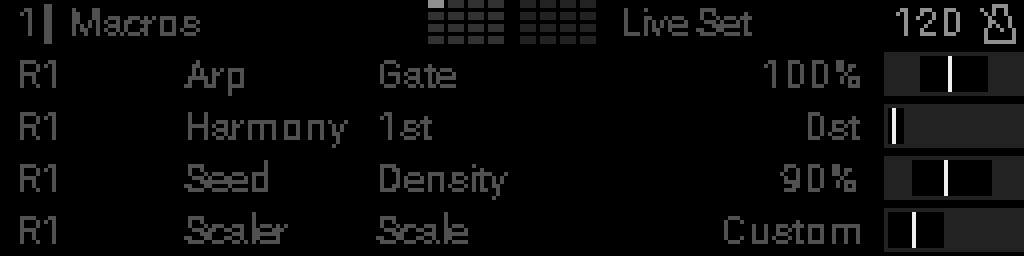
| Row | Device | Parameter | Example in screenshot |
|---|---|---|---|
| 0 | Arp | Gate | Arpeggiator gate length (32–96% range) |
| 1 | Harmony | 1st | First harmony interval |
| 2 | Seed | Density | How many seed notes fire |
| 3 | Scaler | Scale | Which scale preset is active |
Reading a device row
Rack → device → parameter name. The live value is on the far right (percentages, note names, scale names, etc.).
Rack (R1, R2, …)
Which rack in the active project contains the target device.
Device
Short device type name — Arp, Harmony, Seed, Scaler, and so on. Same labels as in the device reference.
Parameter
The field on that device the knob drives — Gate, Density, Scale, Rate, etc.
Live value
Shown in the device’s own units: 100%, Custom, 0st, and so on. Min/max limits from edit mode apply here and on the matching indicator bar.
Elsewhere on screen
When a knob macro targets a device parameter, that parameter’s editor row can show a knob-macro badge (filled dots + knob number). To change or clear the mapping, use Perform → edit mode — not the device parameter list.
Configure these macros
Device parameter macro mode — pick rack, device, and parameter in the grid.