
Knobs Grid
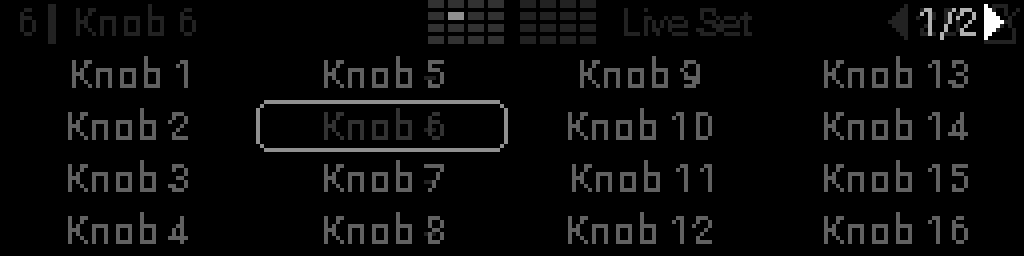
Press Back on Perform to open the Knobs Grid — all 32 knob names in a 4×8 layout (left half = knobs 1–16, right half = 17–32).Use it when you want to look up names without turning knobs. Encoder browsing of knobs happens here; on Perform View the encoder does not open this overlay. Turning a panel knob on Perform still takes over the display.
Moving around
Turn the encoder Turn the encoder to move the highlight through all 32 knobs. Holding Select leaves the highlight where it is. The overlay shows one half at a time (16 names); when you cross the middle, it flips to the other half (1/2 or 2/2 beside the left page arrows).Each cell is left-aligned. The knob number is two digits (01–32) and sits two pixels before the name, with the number drawn darker so it stays readable without a colon. The highlighted cell is brighter (no rounded box). Long names truncate with … inside the cell.
Header mini-grid
The small map in the center of the Perform header shows all 32 knobs — left half = 1–16, right half = 17–32. The taller bright cell is the knob you have selected. It is always visible on Perform View; when this overlay is open, both halves stay bright so you can see where you are across the full panel.
Mini-grid in the header while the Knobs Grid is open.
Leave the overlay
The grid stays until you leave it — it does not close on idle.
| Action | Result |
|---|---|
| Select | Confirms the highlighted knob and returns to Perform for that pot |
| Back | Returns to Perform (does not open snapshots) |
| Turn a knob | Leaves the grid and shows that knob |
| Select + Back | Opens Main Menu (does not open snapshots) |
| Leave Perform | Encoder-button shortcut (Racks / S32 LFOs), Main Menu, or editor jump closes the overlay |
While the grid is open, only the header mini-grid, page arrows, and BPM stay visible — no macro rows or bars behind the name list. The header mini-grid still tracks selection.