
Envelope
ADSR envelope on MIDI
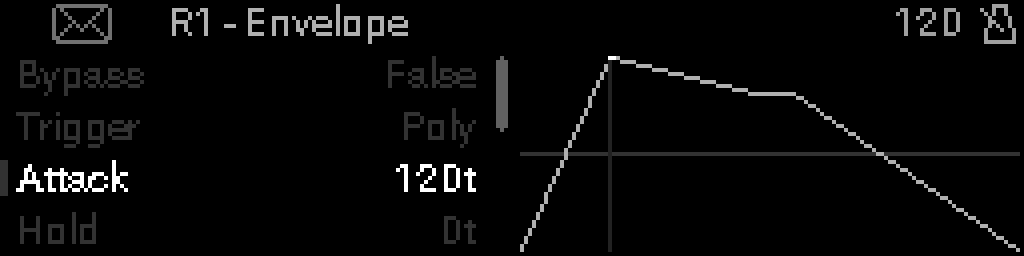
When to use it
Place Envelope when a CC, pitch bend, or other MIDI destination should follow an ADSR shape triggered by notes or a fixed key.
INFO
Sync sets the time unit for Attack, Hold, Decay, and Release.
SYNCED (default) follows MIDI Clock. Times show as note values (1/16, 1/8, 1/4, 1/2, 1/1, 2 BARS, …). Any other time shows a number with T.
FREE uses milliseconds and runs with no MIDI Clock.
Parameters
| Parameter | Range | What it does |
|---|---|---|
| Bypass | 0 – 1 | When on, Dest returns to rest and MIDI passes through unchanged. |
| Trigger | 0 | What starts the envelope: mono, keyed, polyphonic, or looping. |
| Key Note | 0 – 127 | Note that starts the envelope when Trigger is Key. |
| Sync | 0 – 1 | SYNCED follows MIDI Clock. FREE uses milliseconds and does not need Clock. |
| Attack | 0 – 768 | Time to rise to full level after a trigger. |
| Hold | 0 – 768 | Time the peak is held before decay. |
| Decay | 0 – 768 | Time to fall from the peak to the sustain level. |
| Sustain | 0 – 100 | Level held while the note is down (0–100%). |
| Release | 0 – 768 | After you let go, how long the note stays on while the destination fades. |
| Curve | 0 – 1 | Shape of Attack, Decay, and Release: LINEAR or LOG. |
| Depth | -100 – 100 | How far the envelope moves the destination (−100 to +100%). |
| Offset | 0 – 100 | Level before the envelope is added (0–100%). |
| Dest | 0 | MIDI message the envelope drives (CC, pitch bend, and so on). |
| Dest MSB | 0 – 127 | High byte of the destination (NRPN, RPN, or CC MSB). |
| Dest LSB | 0 – 127 | Low byte of the destination (NRPN, RPN, or CC number). |
Parameter values
Bypass
| Value | Name | Meaning |
|---|---|---|
| 0 | Off | Device is active and processes MIDI. |
| 1 | On | Device is bypassed. Dest returns to rest; other messages pass through. |
Trigger
| Value | Name | Meaning |
|---|---|---|
| 0 | Mono | One envelope. A new note starts it again. |
| 1 | Key | Starts only from Key Note. |
| 2 | Poly | One envelope per held note. |
| 3 | Loop | Keeps cycling while notes are held. |
Sync
| Value | Name | Meaning |
|---|---|---|
| 0 | FREE | Times are milliseconds. Runs without MIDI Clock. |
| 1 | SYNCED | Times follow MIDI Clock (default). |
Switching from FREE to SYNCED sets each time to the nearest note value.
Curve
| Value | Name | Meaning |
|---|---|---|
| 0 | LINEAR | Attack, Decay, and Release are straight ramps. |
| 1 | LOG | Attack, Decay, and Release rise quickly, then ease into the target. |
Attack, Hold, Decay, Release
On SYNCED, a time on this list shows the note name. Any other time shows the number and T.
On FREE, the number is milliseconds.
SYNCED names:
| Time | Name |
|---|---|
| 2 | 1/64 |
| 3 | 1/32 |
| 6 | 1/16 |
| 12 | 1/8 |
| 24 | 1/4 |
| 48 | 1/2 |
| 96 | 1/1 |
| 192 | 2 BARS |
| 384 | 4 BARS |
| 768 | 8 BARS |
Release
After you let go, the note stays on while the destination fades. The note ends when Release finishes. If the transport stops before that, the note ends then. Release 0 ends the note right away.
Mono does this when the last note of a chord goes up. Poly fades each note on its own. Key does this only for Key Note. Loop ends the note as soon as you let go.
Dest
On the device the list is CC, Pitch Bend, Ch. Pressure, Poly AT (only when Trigger is Poly), CC 14-bit, NRPN, RPN, then Prog. Change.
With Poly and Poly AT, each held note sends its own pressure. Any other destination sends one message that follows the held note with the highest level.
| Name | Meaning |
|---|---|
| CC | One control change. |
| Pitch Bend | Pitch wheel. |
| Ch. Pressure | Channel aftertouch. |
| Poly AT | Pressure per note. Shown only when Trigger is Poly. |
| CC 14-bit | 14-bit control change (MSB and LSB). |
| NRPN | Non-registered parameter. |
| RPN | Registered parameter. |
| Prog. Change | Program change. |