
Knob snapshots
Knob snapshots store the 32 pot positions in the active project so you can jump between scenes without leaving Perform.
Take and recall live on the 4×8 pad, one tap from Main Menu → Snapshots.
Open the slot grid
- Open Main Menu (hold Select + Back from Perform).
- Choose Snapshots. The 4×8 snapshot grid opens straight away — there is no part to pick. The header reads Knobs Snapshots. Each pad is left-aligned: slot number at the left, then the name. Empty pads show the number only. The highlighted pad uses the same four-corner mark as Arrange (no rounded box).
Marks on a pad:
- Full-height stamp behind the number — this slot is the active snapshot for this bank.
- Dimmer clock-breathing stamp plus quarter marks to the right of the number — Arrange QUEUE is armed for this pad, or a delayed SYNC recall is waiting. Empty quarter marks are the time still left. Immediate recalls have no upcoming cue.
*after the name — knobs have moved since TAKE or recall (RAM only).
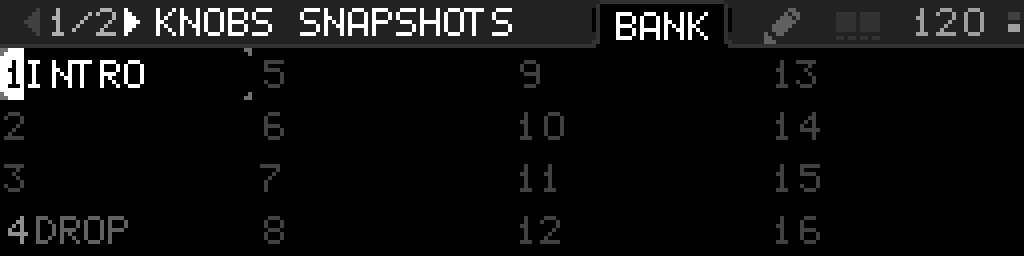
A pad waiting on SYNC 1 BAR (here slot 4) uses the dimmer stamp and shows every quarter of the wait — filled, current, and still left.
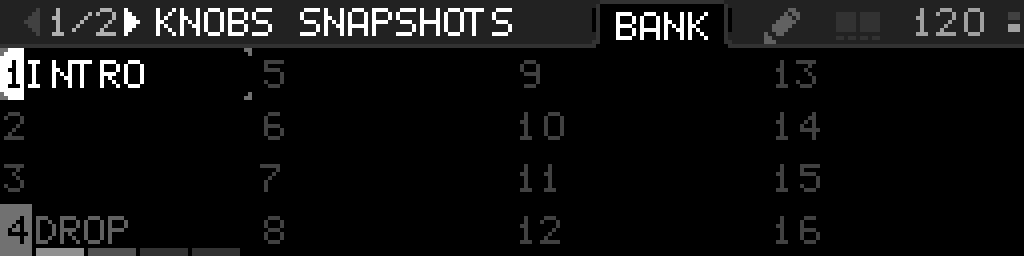
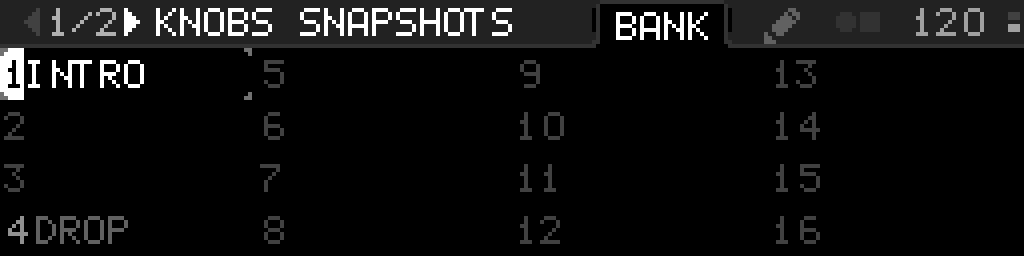
Folder tabs BANK and a pencil sit left of the BPM band. The selected tab fills the header to the top, with a thin shadow on both sides. The pencil is SETTINGS — it is never the word SETTINGS. Two small filled squares between the tabs and the BPM mark Select + Back. Hold Select on a pad (empty or occupied) and the right square fills until the slot menu opens. On an occupied pad the mark also becomes a circle and square (hold Select and turn to morph). The gray header line continues under the BPM to the right edge of the screen, and meets the tab corners with a tiny radius.
Recall, take, rename, delete
| Control | Occupied slot | Empty slot |
|---|---|---|
| Select | Morph live to that pad (this bank's FADE TIME / Instant) | Ignored (unless you just chose + TAKE A SNAPSHOT and are picking a slot) |
| Select + Back | Switch BANK ↔ pencil | same |
| Select long-press | Nested menu: RETAKE A SNAPSHOT, EDIT SNAPSHOT (Rename, Copy, Swap, Move, Delete) | Nested menu: + TAKE A SNAPSHOT |
+ TAKE A SNAPSHOT on an empty pad stores the current knobs into that cell. RETAKE A SNAPSHOT on an occupied pad recaptures that same cell (not the next free slot). A new slot is named S1…S32 from that slot number.
COPY, SWAP, and MOVE close the nested menu. The next Select on the 4×8 is the destination (same dest-pick as TAKE). Copy duplicates that slot’s stored values and name — it does not recapture the live knobs. Occupied destinations ask OVERWRITE THIS SNAPSHOT? Source stays on Copy. Swap exchanges two occupied slots; swapping onto an empty pad moves the slot there. Move copies then clears the source. Selecting the same pad as the source does nothing.
EDIT SNAPSHOT is Rename, Copy, Swap, Move, and Delete. To leave one macro where it is on every recall, fade, and morph, open edit mode and choose Macro Options → IN SNAPSHOT OFF. That switch covers every snapshot. It stays on the list even when no knobs snapshot is occupied, and it starts ON. The header knob grid shows a gap through that knob’s cell while any of its macros reads OFF. To keep a device or LFO parameter out of every snapshot, use Options → IN SNAPSHOT on that parameter row — see Keep one parameter under your hands.
Rename opens the text editor. The name is stored in the project and shown on the grid and on the Perform header.
Pencil (SETTINGS)
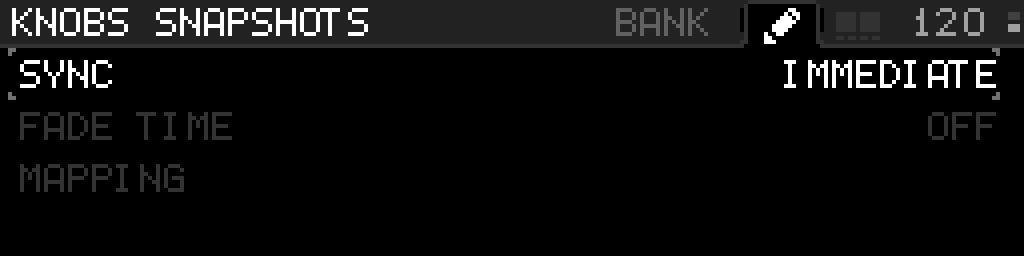
SYNC is how long this bank waits after a pad recall, MIDI, or a SNAP macro before the scene lands: IMMEDIATE (default), 1 BAR, 2 BARS, 3 BARS, 4 BARS. Hold Select and turn the encoder (same hold as Arrange RATE). Turning past 4 BARS or back past IMMEDIATE stops — it does not wrap. Choosing another occupied pad while a wait is counting keeps the same bar window — it does not start the count over. Leaving the 4×8 while a pad is waiting does not cancel the launch — come back and that pad is still highlighted. Select the same waiting pad again to cancel.
FADE TIME on this same pencil is how long that bank glides from what you are hearing into the pad: OFF (instant, default), then 1/16, 1/8, 1/4, 1/2, 1 BAR, 2 BARS, 4 BARS. Hold Select and turn the encoder (same hold as SYNC). Arrange FADE TIME is only the song playhead — it does not change this bank.
MAPPING is one row. Select opens MAP SNAPSHOT (slot index) and MAP MORPH (blend from live to the current snapshot; hub title MAP AMOUNT). Internal opens the knob/macro picker. External learns CC / 14-bit CC. UNMAP MORPH appears there when a morph-amount macro is mapped.
MAP SNAPSHOT opens Internal mapping (a knob macro steps the slot 0–31 with hysteresis) or External mapping (learn a Program Change 0–31, a note 0–31 as the slot, or a stepped CC). NEXT and PREV learn a separate source that recalls the next or previous occupied slot on this bank (skip empty, wrap). An empty bank does nothing. A CC button (0 / 127) steps once per press; a fader sweep steps once as it crosses the midpoint. Notes 32–127 are ignored by absolute snapshot mapping so they still reach devices. An empty slot does nothing. LFOs cannot target snapshot index. A snapshot-slot or morph-amount macro on Perform reads SNAP, Knobs (or the rack name), and the scene name on the right / MORPH, Knobs TO DROP, and 42% on the right — see Snapshot and morph knobs on Perform for how that reads when only one or two macros are on. Those macros also have MIN / MAX (0–100% on the macro grid; one percent per detent) and INVERT. They do not show PICKUP. The editor PART row is KNOBS, LFOS, or RACK1…RACK8. Snapshot and morph-amount knobs are not rewritten when that bank’s snapshot is recalled or morphed — they stay the controllers.
Occupied Select starts a morph live to that pad when this bank's FADE TIME is on, or lands instantly when it is OFF. Hold Select and turn the encoder on an occupied pad to morph by hand (also while a glide is running). Options on that pad uses the encoder for the menu, even if Select is still down. FADE TIME for that glide lives on this bank’s pencil, not on Arrange.
LFO and rack banks from Main Menu Snapshots use this same 4×8 (header LFOs Snapshots or Rack 1 Snapshots…Rack 8 Snapshots, not the rack name). Nested Options on the LFO grid / racks list open SNAPSHOTS BANK to reach the pad.
This pad Options menu has no Arrange shortcut. Open Arrange from ARRANGE on Main Menu (first item).
COPY / SWAP / MOVE close the menu and title the 4×8 COPY 12 / MOVE 12 / SWAP 12 (1-based source). BANK stays selected. Select the destination pad, Select the source again to cancel, or Back to leave.
Another occupied pad while a morph is running retargets. Empty pads TAKE.
Recall and take do not force a flash save. Use Save Project when you want the new slots to survive power-off.
Perform header
The Perform header does not show the snapshot name or a morph fader. After you move a knob, a * can still follow the pad name on the 4×8 until you TAKE or recall again (RAM only — not saved with the project). COPY, SWAP, and MOVE do not recapture live knobs; Swap and Move of the active pad keep the * if knobs already differ from the stored scene. Deleting a different pad does not move the active name back and does not clear that *. LFO and rack edits do not set this mark.