
Step Seq
Classic clock-synced step sequencer
When to use it
Add Step Seq after a Clock when you want a classic 4–16 step sequencer you edit on a full-screen grid — notes with velocity and gate.
INFO
Needs clock (internal or external). Unlike most devices, Step Seq opens a custom step grid instead of a plain parameter list.
Editing the grid
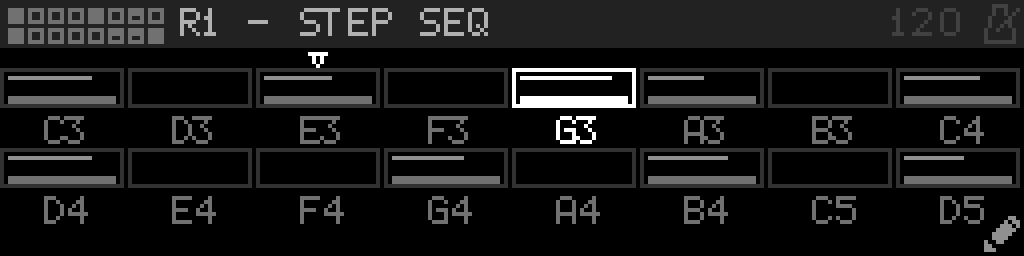
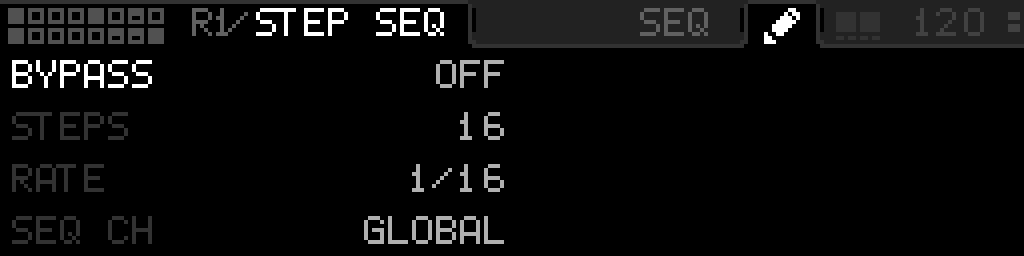
Step Seq opens a full-width step grid (not the usual parameter list). An open-left title shows the Step Seq icon and R#/STEP SEQ (rack number, like other devices). Folder tabs SEQ and a pencil sit left of the BPM band (never the word SETTINGS). A small dim two-square mark between the tabs and the BPM is Select + Back. The gray header line continues under the BPM.
| Control | SEQ (grid) | Pencil (device settings) |
|---|---|---|
| Encoder | Move focus across steps | Move between settings rows |
| Select | Toggle the focused step Active | Latch sticky edit on the focused settings row (same as other parameter lists) |
| Hold Select + encoder | Nudge Note; does not open a menu. After 200 ms the header shows a circle and square | Hold-edit the focused settings row (that release does not stay latched) |
| Select + Back | Switch to the pencil | Switch back to SEQ |
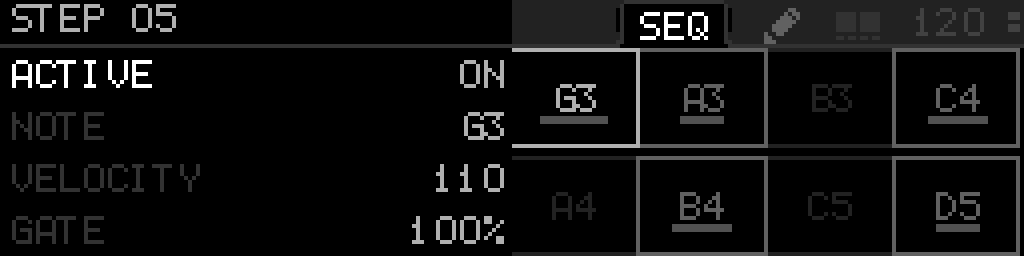
| Long-press Select | The header Select square fills while you hold, then a left list titled STEP 05 (1-based) opens with that step’s fields and values. Short Select on a list row latches sticky edit; it does not toggle Active | Open Options for the focused settings row |
| Back | Leave Step Seq | Leave Step Seq (does not return to SEQ). While sticky, Back restores the value first |
Filled steps show a short velocity bar under the note name. It is a simple centered indication: visible from velocity 1, hidden at 0. Turning velocity grows the bar evenly from the middle. A 2-pixel-thick square playhead sits just inside the cell border. Pads sit on the left of the screen. Neighboring pads share one line. Hovering a disabled step stays dimmer than hovering an active one. Idle steps use the same dim gray for the name and the frame. Each pad shows the note name in the cell.
With a STEP list open on the left, Back closes it and stays on SEQ (and restores the field if you were in sticky edit). Select + Back still switches SEQ / pencil. Long-press Select on a STEP-list row opens that row’s Options on the right. There is no PARAMS header tab and no in-grid pencil.
Settings parameters
| Parameter | Range | What it does |
|---|---|---|
| Bypass | 0 – 1 | When on, the device is disabled and MIDI passes through unchanged. |
| Steps | 4 – 16 | Number of steps in the pattern (4–16). |
| Rate | 0 – 6 | Clock division for each step advance. |
| Seq Ch | 0 – 16 | Default MIDI channel for note output (Global follows the project global channel). |
| Direction | 0 – 2 | How the playhead walks the step ring: forward, reverse, or ping-pong. |
| Randomize | 0 – 1 | Momentary action — randomizes active steps using Rand Depth. |
| Rand Depth | 0 – 100 | How aggressively Randomize rewrites step fields (0–100%). |
Per-step parameters
These fields are per step (not in the settings list). Long-press Select on a focused step — the header Select square fills while you hold — to open them on the left. Each row shows its live value. Tap Select to latch sticky edit, or hold Select and turn. Short Select on the grid still toggles Active. LFO, knob-macro, and external mappings can target a step field with that step’s index.
| Parameter | Range | What it does |
|---|---|---|
| Active | 0 – 1 | Whether the step fires when the playhead lands on it. |
| Note | 0 – 127 | MIDI note number for this step. |
| Velocity | 1 – 127 | Note-on velocity (also drawn as the short bar under the note name). |
| Gate | 10 – 200 | Note length as a percentage of the step. |
| Channel | 0 – 16 | Per-step channel override (Global uses Seq Ch). |
| Probability | 0 – 100 | Chance the step fires when active (0–100%). |
TIP
Steps, Rate, Seq Ch, Direction, and Randomize live on the pencil tab (Select + Back from SEQ).
Parameter values
Bypass
| Value | Name | Meaning |
|---|---|---|
| 0 | Off | Device is active and processes MIDI. |
| 1 | On | Device is bypassed; messages pass through unchanged. |
Rate
| Value | Name | Meaning |
|---|---|---|
| 0 | 1/1 | One note per bar (quarter-note grid). |
| 1 | 1/2 | Half-note steps. |
| 2 | 1/4 | Quarter-note steps. |
| 3 | 1/8 | Eighth-note steps. |
| 4 | 1/16 | Sixteenth-note steps. |
| 5 | 1/32 | Thirty-second-note steps. |
| 6 | 1/64 | Sixty-fourth-note steps. |
Seq Ch
| Value | Name | Meaning |
|---|---|---|
| 0 | Global | Use the project global MIDI channel when a step has no override. |
| 1 | Ch1 | Force note output to MIDI channel 1 (Ch2–Ch16 work the same way). |
Direction
| Value | Name | Meaning |
|---|---|---|
| 0 | Fwd | Playhead advances 0 → last step, then wraps. |
| 1 | Rev | Playhead walks last → 0, then wraps. |
| 2 | PingPong | Playhead reverses direction at each end. |
Randomize
| Value | Name | Meaning |
|---|---|---|
| 0 | Off | Idle — press Select on Randomize to fire once. |
| 1 | On | Triggers a one-shot randomize of the pattern. |