
Text editor
The name editor renames knobs, projects, MIDI racks, and snapshots. Names are uppercase only. You reach the editor from edit mode ( Select on the name field), project menus, rack lists, or snapshot grids depending on context.
Normal mode — caret placement
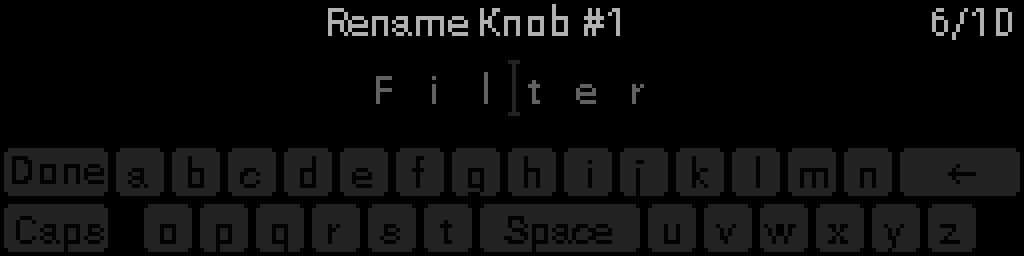
When the editor opens, normal mode shows the current name with an insertion caret. Turn the encoder Turn the encoder to move the caret between characters (including the append position after the last character).
| Control | Action |
|---|---|
| Turn the encoder Encoder | Move insertion caret |
| Select (short) | Open the virtual keyboard at the caret |
| Back (short) | Save if changed and exit |
Open the keyboard
Press Select to switch to keyboard mode. The letter page shows A–Z only. The header shows 1/2 or 2/2 when both letter and symbol pages are available.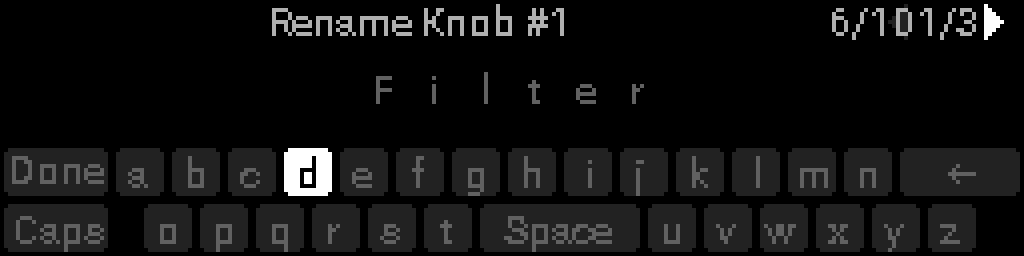
| Control | Action |
|---|---|
| Turn the encoder Encoder | Move key focus (characters → Backspace → lower row → blank Space key). Past the last key opens the next page |
| Select (short) | Activate focused key (insert character, Backspace, or Space) |
| Back (short) | Close keyboard and return to normal mode (does not exit the editor) |
| Select (long) or Back (long) | Close keyboard |
Symbols page
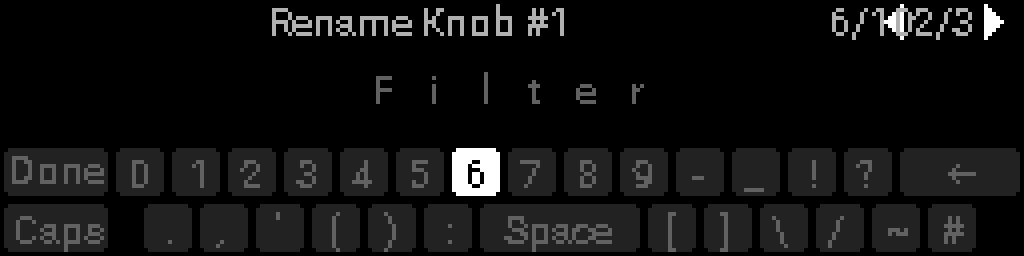
Turn the encoder past the end of the letter page to reach the symbols page — digits, punctuation, and special characters.
TIP
The wide blank key on the bottom row inserts a space. Backspace deletes the character before the insertion caret. Use Back to leave the keyboard.
Save and exit
- Back (short) from normal mode commits the name (when changed) and exits.
- Empty names are not committed — the previous name is kept.
- Context titles show what you are renaming (e.g. RENAME KNOB #1, RENAME PROJECT).
- Legacy mixed-case names display and re-save as uppercase.
Where the editor appears
| Context | How to open |
|---|---|
| Knob name | Perform → edit mode → Select on knob name row |
| Project name | Project menu |
| Rack name | Racks → select rack → rename |
| Snapshot name | Snapshots grid → rename |