
LFO parameter macro rows
LFO parameter macros let the knob adjust an LFO — its rate, depth, phase, and so on. The LFO then modulates whatever you assigned it to (macros, device parameters, etc.).
This is knob → LFO, not LFO → macro. If an LFO is modulating a CC macro, you see the ~ badge on a classic MIDI row, not an LFO-parameter row.
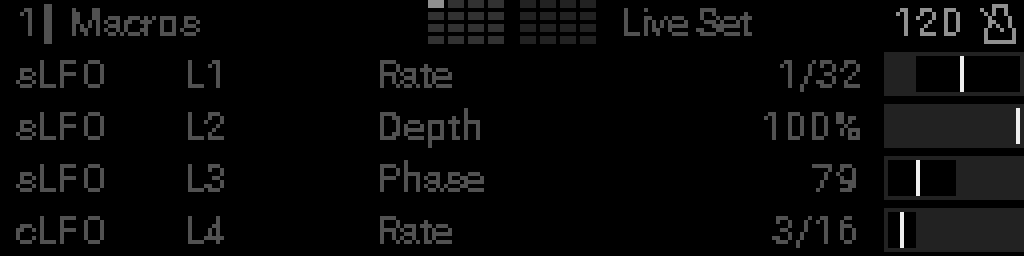
| Row | Mode | Target | Example in screenshot |
|---|---|---|---|
| 0 | sLFO | L1 · Rate | S32 LFO 1 rate (synced division) |
| 1 | sLFO | L2 · Depth | S32 LFO 2 depth (20–80%) |
| 2 | sLFO | L3 · Phase | S32 LFO 3 phase (0–180°) |
| 3 | cLFO | L4 · Frequency | CV16 LFO 4 frequency (Hz) |
Reading an LFO parameter row
Mode (sLFO or cLFO) → which LFO (L1–L16) → which parameter (Rate, Depth, …) → live value on the far right.
Mode
| Tag | Meaning |
|---|---|
sLFO | S32 LFO — one of the LFOs in the project (LFO menu) |
cLFO | CV16 LFO — an LFO on a connected CV16 expander |
Which LFO
L1 … L16 — the LFO index in that pool (LFO 1, LFO 2, …).
Which parameter
The LFO field the knob edits: Rate, Depth, Phase, Frequency, Amplitude, and others. Available fields depend on the mode — see the S32 LFO macro and CV16 LFO macro grids.
Live value
Formatted for that parameter: musical rates (1/8, 1/32), %, °, Hz, etc.
S32 vs CV16 LFO
| sLFO | cLFO | |
|---|---|---|
| LFOs live in | S32 project | CV16 expander module |
| Needs hardware | No | CV16 connected |
| Typical use | Modulate rack devices and MIDI macros | Eurorack / CV-centric setups |
CV16 direct voltage on a jack (not an LFO field) is covered in CV16 control.