
CV16 control macro rows
With a CV16 expander connected, macros can drive control voltages on the module’s jacks. On Perform you will see either CV (direct voltage out) or cLFO (adjust a CV16 LFO parameter — same row shape as S32 LFO rows).
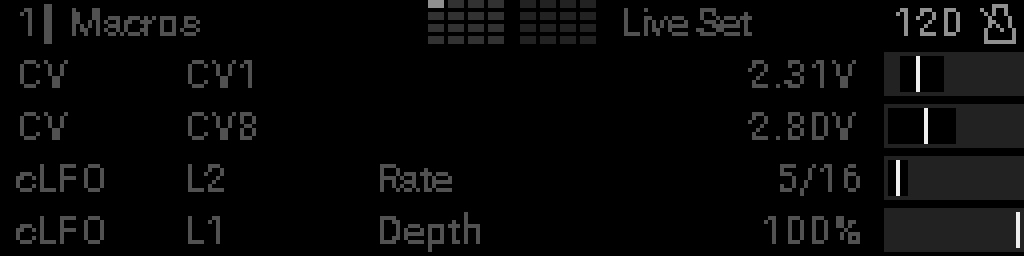
| Row | Mode | Target | Example in screenshot |
|---|---|---|---|
| 0 | CV | CV1 | Direct output, 1.0–4.0 V range |
| 1 | CV | CV8 | Direct output, full range, inverted |
| 2 | cLFO | L2 · Rate | CV16 LFO 2 rate |
| 3 | cLFO | L1 · Depth | CV16 LFO 1 depth |
Direct voltage (CV)
CV rows: mode tag CV → jack (CV1–CV16) → voltage on the far right. No MIDI channel or output boxes.
The knob sets the voltage on the chosen jack within the min/max you configured (typically 0–5 V). Row 1 in the screenshot is inverted — clockwise on the knob pushes the voltage down, and the indicator bar mirrors left/right.
Configure in the CV16 direct control macro grid.
CV16 LFO parameter (cLFO)
Rows tagged cLFO match the layout on LFO parameter rows: mode → L# → parameter name → value. They target LFOs on the CV16 module, not the S32’s internal LFOs.
Configure in the CV16 LFO macro grid.
Hardware note
CV16 macros only take effect when a CV16 expander is linked. You can still configure them in edit mode without hardware, but no voltage is output until the module is connected.