
Rack Chains
A rack is an ordered list of MIDI devices. MIDI enters at the start of the chain and exits at the end — like pedals on a floor or modules in a DAW chain.
Why chains matter
Each device transforms or routes MIDI:
- Filters pass or block by channel, note range, CC type
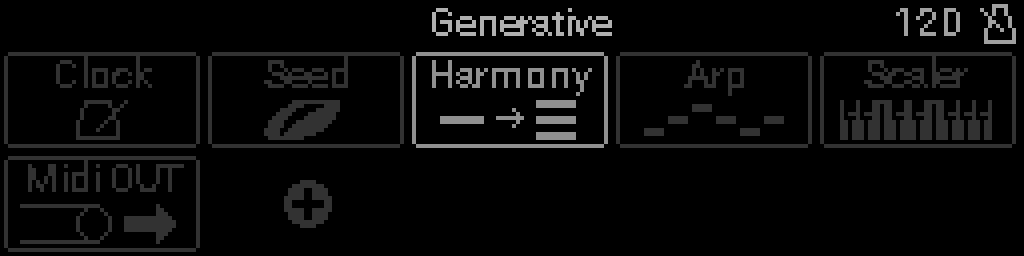
- Generative devices (Arp, Euclid, Seed, Step Seq) create new notes
- Pitch devices (Scaler, Transpose, Harmony) reshape pitch
- I/O devices connect to physical ports or clock
TIP
Order matters: a Channel Filter before an Arpeggiator behaves differently than after.
Building a chain
- Main Menu → Racks → pick a rack.
- Empty slots show + — open the device picker.
- Select a device to open its parameter list (Step Seq opens a step grid; Euclid opens a GRID of layer rows).
- Long-press Select on a device in the grid to open Options. Move Device (when the device can slide) then turn the encoder to reorder; Select drops it, Back cancels. Holding Select while moving still drops — it does not reopen Options. MIDI IN stays first. MIDI OUT stays last. The header Select square fills while you hold for Options.
Parameter editing
Device parameters use the same list UI as LFOs:
- Turn the encoder Encoder — move between rows, or change the value while sticky edit is latched
- Select — latch sticky edit on a value (tap again to keep it); on/off rows still toggle
- Back — while sticky, restore the value from when you entered and leave the list
- Long-press Select — Options → Modulation (Assign LFO), Mapping (Internal / External mapping), or IN SNAPSHOT (keep this one parameter out of every snapshot — see Snapshots)
INFO
See Device reference for every device type.
Multiple racks
Each project holds up to 8 racks. Route different MIDI streams through different chains (see Router and Dispatch devices).
Rack snapshots
Long-press Select on a rack in the list opens Rename, Duplicate, Clear, and Snapshots. Snapshots nests + TAKE A SNAPSHOT and the occupied slots for that rack only. Select an occupied slot to recall it. An empty rack cannot be stored.See Rack snapshots.
Devices in a chain
Each rack chain can hold up to 10 devices total. When you open the device picker, types you cannot add right now appear dimmed — the rack may be full, or you already have the maximum of that type.
Duplicate on a device side menu follows the same rules as adding from the picker.
Per-type maximums (one rack)
| Device type | Max in one rack |
|---|---|
| Total devices | 10 |
| MIDI Input / MIDI Output / Clock | 1 each |
| Scaler / Transpose / M2CV | 1 each |
| Euclid | 3 |
| Other types (default) | 4 each |
Category maximums
Device types in the same category share a cap when there is no per-type rule above:
| Category | Max per type in one rack |
|---|---|
| I/O & Clock | 1 |
| Generative | 4 |
| Pitch & Harmony | 4 |
| Filters | 8 |
| Routing | 4 |
| Dynamics | 4 |
| Effects | 4 |
| Utility | 4 |
Per-type rules (for example, only one Clock) override the category default.
If the S32 refuses to add or duplicate a device, see Troubleshooting.