
Classic MIDI macro rows
These macros send MIDI when you turn the knob — control changes, program change, channel pressure, NRPN/RPN, pitch bend, and (eventually) SysEx. On Perform, they all share the same row shape: message type on the left, routing in the middle, live level on the right.
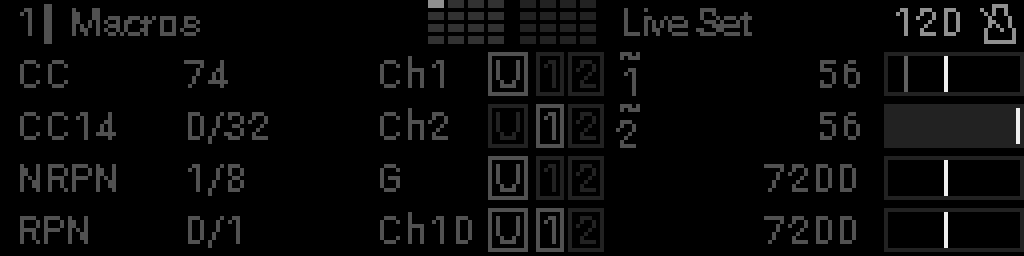
| Row | Mode | Example in screenshot |
|---|---|---|
| 0 | Control Change | CC 74 (filter cutoff), channel 1, USB, LFO-modulated |
| 1 | 14-bit CC | Controllers 0 and 32, channel 2, DIN Out 2, narrowed range |
| 2 | NRPN | NRPN 1 / 8, Global channel, USB |
| 3 | RPN | RPN 0 / 1, channel 10, USB + DIN Out 1 |
Reading a classic MIDI row
Follow each row left to right: what message → which controller or parameter → which MIDI channel → which outputs (and LFO badge if modulated). The live value sits on the far right, outside this highlight.
Message type
Short tag for the MIDI message the macro sends:
| Tag | Macro mode |
|---|---|
CC | Control Change (7-bit) |
CC14 | 14-bit Control Change |
PC | Program Change |
MONO AT | Channel Aftertouch (channel pressure) |
POLY AT | Poly Aftertouch (per-note pressure) |
NRPN | Non-Registered Parameter Number |
RPN | Registered Parameter Number |
SYX | SysEx — see SysEx on Perform (guide coming soon) |
Controller or parameter numbers
Which MIDI address the knob drives:
| Mode | This field shows |
|---|---|
| CC | The control change number (e.g. 74 for cutoff, 7 for volume) |
| CC14, NRPN, RPN, SysEx | MSB/LSB pair (e.g. 0/32 — the two controller numbers for a 14-bit message) |
| PC, MONO AT | (nothing — the message type alone is enough) |
| POLY AT | The note name that receives pressure (Middle C setting; MIDI 0–127 on the wire) |
These are the same numbers you set in the macro grid (MSB / LSB fields).
MIDI channel
Glob = Global — uses the project’s global channel setting.Ch1–Ch16 = fixed channel for this macro only.
Output ports
Three boxes show where the message is sent:
| Box | Port |
|---|---|
| U | USB MIDI |
| 1 | DIN Out 1 |
| 2 | DIN Out 2 |
A bright box is enabled for this macro; a dim box is off.
LFO modulation badge
When an S32 LFO is modulating this macro (not the same as “LFO parameter” macros), a ~ appears with the LFO number (e.g. ~ / 1). Bright = that LFO is running; dim = assigned but off. See Modulation.
Live value
Right-aligned number from the current knob position — 0–127 for 7-bit modes, 0–16383 for 14-bit modes. If you narrowed min/max in edit mode, the value respects that range and the indicator bar may show checkered bands at the limits. A CC (or other classic MIDI dest) whose min and max are consecutive integers — typically 0 and 1 for on/off — uses the same moving switch pad as LFO sync.
Program change and channel aftertouch
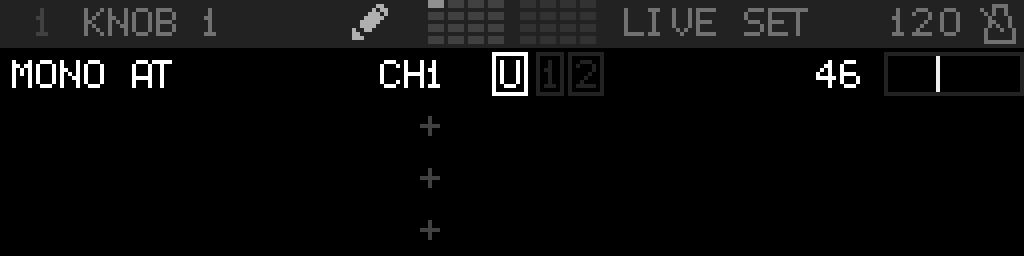
Same layout as CC, but there is no controller number in the middle — only the PC or MONO AT tag, channel, outputs, and value.
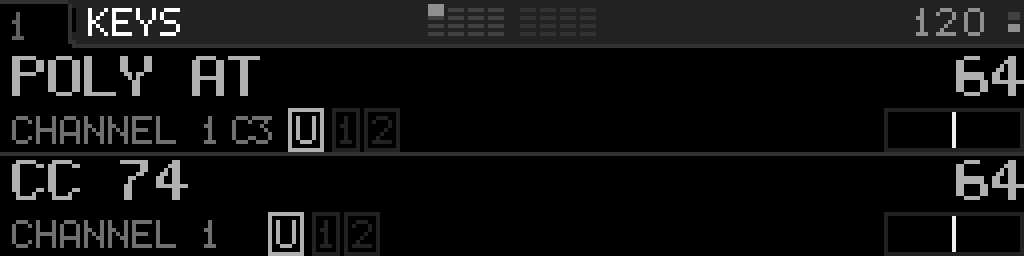
Poly aftertouch
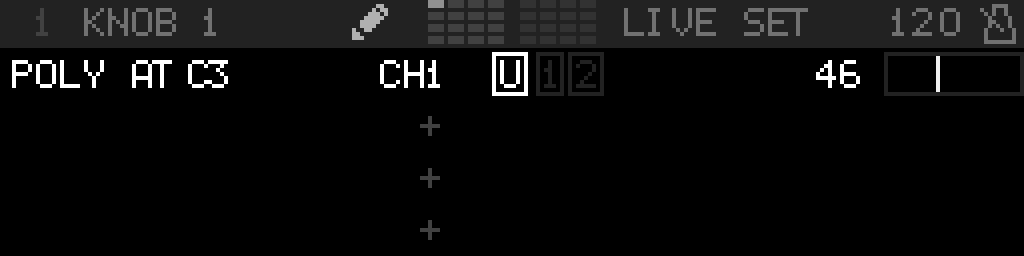
POLY AT is like CC: the middle column is the note name that receives pressure (same octave convention as Settings → Note Names; default MIDI 60 = C3). The knob maps pressure 0–127. Channel, outputs, and value sit in the same places as CC.
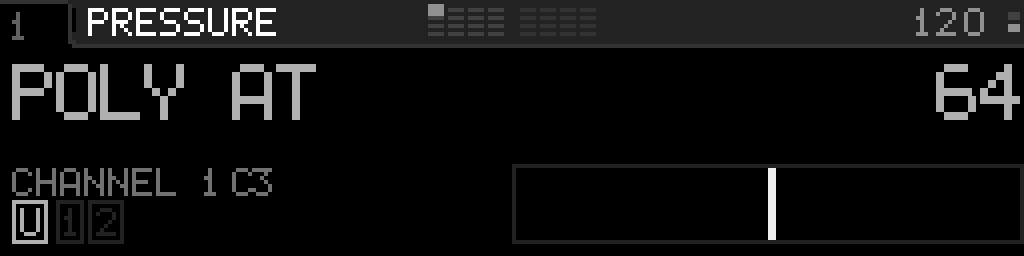
With one macro on, POLY AT is the large name (same as MONO AT / CC). The note name sits with the channel on the lower line.
With two macros on, each row keeps the mode name on the upper line and channel + note (plus outputs) on the lower line.
Name a control
You can give any classic MIDI macro (CC, CC14, PC, MONO AT, POLY AT, NRPN, RPN, PB, SysEx) a custom name. When set, the name replaces the message type and controller/parameter columns, so the row reads like the thing it controls instead of a raw MIDI address. The channel, outputs, and live value stay exactly where they are.
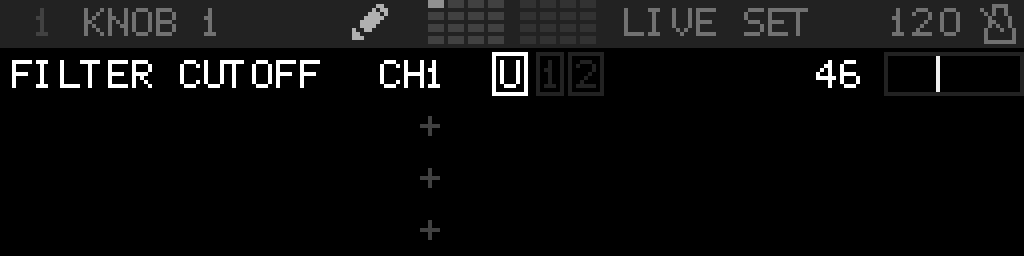
Long names are shortened with a trailing … so they never overrun the channel column.
To add, change, or remove a name, open the macro side menu: in edit mode, select a macro row and long-press Select.
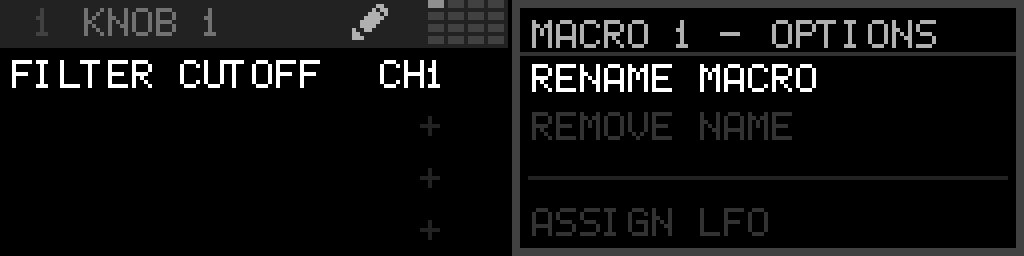
| Item | When shown | Action |
|---|---|---|
| Name Macro | Row has no name | Opens the text editor to type a name |
| Rename Macro | Row already named | Reopens the editor with the current name |
| Remove Name | Row already named | Clears the name (asks to confirm) and restores the default layout |
Names are saved with the project.
MIDI Learn
Instead of setting the message type and numbers by hand, you can teach a macro from your controller. Open the macro side menu (in edit mode, select a macro row and long-press Select), choose MIDI Learn, then move a knob, press a key, or send the message you want to capture.
MIDI Learn appears for the modes a macro can send: CC, 14-bit CC, Program Change, Aftertouch, Poly Aftertouch, Pitch Bend, and SysEx. A Disabled macro row offers only MIDI Learn — capture turns the macro on with the learned message.
| You send | The macro becomes |
|---|---|
| A control change | CC on that controller number and channel |
| A 14-bit CC (MSB + paired LSB) | CC14 on that controller pair and channel — detected automatically |
| A program change | PC on that channel |
| Channel aftertouch | MONO AT on that channel |
| Polyphonic aftertouch | POLY AT on that note and channel |
| Pitch bend | PB on that channel |
| A SysEx message | SysEx bound to the whole captured message |
The prompt stays up until a message arrives; press Select or Back to cancel. As soon as a message is captured, the macro’s mode and fields update to match and the change is saved with the project. You can then fine-tune it in the macro grid (for example, narrow the range, or pick which SysEx byte the knob drives).
INFO
Notes are not learnable here — macros do not send notes. This is also different from External Mapping, which points incoming MIDI at a device or LFO parameter instead of configuring the macro’s own output.
Configure these macros
- Control Change · 14-bit CC · Program Change · Aftertouch · Poly aftertouch · NRPN · RPN · Pitch Bend